KPI component in Performance Overview
When you select a single employee or organization and multiple KPIs
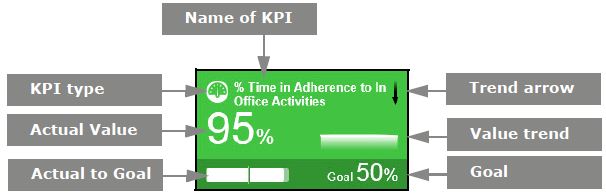
Each KPI Component displays the type and name of the KPI, trend Feature in Speech and Text Analytics that helps users identify changes in customer communication with the contact center, understand any emerging tendencies, and pinpoint any significant events that may require close attention. arrow, value trend, goal, actual to goal, and actual value. The color of the KPI Component indicates the score. When the system requires a recalculation of the goal, an exclamation mark appears. When there is no data or the user does not have privilege Permissions associated with each role that define the features of the application a user is able to view and the functionality in the application the user can access. to view the score, the KPI component appears gray.
|
Element |
Description |
|---|---|
|
Score (Color) |
The score only displays if you have privileges to view it. |
|
KPI name |
The name of the KPI. |
|
KPI type |
An icon identifies the KPI type. Point to the icon to see the name of the KPI Type
Roll-up KPIs are aggregated from the person to the supervisor or organization level. That is, the data of all employees in a specific organization (and its suborganizations) or under a specific supervisor is aggregated to one value in the organization or supervisor level. When a user moves between organizations, their data for the complete period, depending on the period view, is aggregated into the data for the organization they are part of at the end of the period. In monthly view, it is the complete data for that month that gets attributed to the organization. In weekly view, it is the complete data for that week, that gets attributed to the organization. |
|
Actual Value |
The actual calculated value for the KPI |
|
Actual to Goal |
A bar displaying the actual calculated value as it progresses toward the goal. The total bar length is the range between the lowest value and the highest value as configured per the KPI. The | in the bar represents the goal. |
|
Trend arrow |
The trend arrow indicates the direction of the progress toward the goal of the KPI The color of the arrow indicates the desirability of the trend.
The direction of the arrow indicates the trend of the data.
|
|
Value Trend |
A graphical representation of the direction of progress toward the goal. |
|
Goal |
The desired value for the KPI. The goal only displays if you have privileges to view it. |
 Person
 Person Roll-up to Organization
 Organization
  Supervisor Roll-up
  EDM
EDM