Personal Textual field descriptions (WCAG)
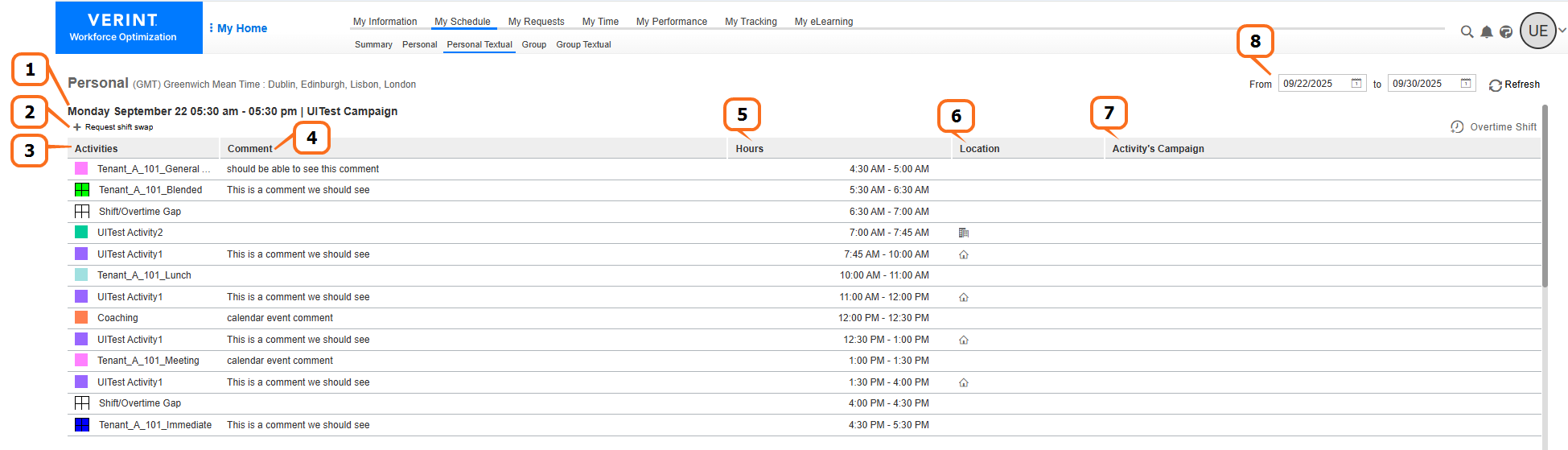
When viewing your schedule in Personal Textual view, the details of each shift Work period in WFM that has a definite length. within the selected date range are displayed in separate tables.
|
Number |
Column |
Description |
|---|---|---|
|
1 |
Heading of each table |
Displays the date, time, and campaign Collection of scheduling periods in WFM, which are defined time periods where specific employees target specific workloads. of each shift. |
|
2 |
+Request shift swap |
Allows you to request a shift swap for the shift. You can create a shift swap board posting or submit a request for a shift swap. |
|
3 |
Activities |
Activity of the shift event Time period in WFM when employees are scheduled for specific activities, other than the main shift activity. Shift events can either be productive or unproductive, and can be associated with activities such as Phone, Email, Break and Lunch. within the shift. |
|
4 |
Comment |
Comment about the shift event. |
|
5 |
Hours |
Time range of the shift event. |
|
6 |
Location |
If the location is specified for an activity Core component of both schedules and time records in Workforce Management (WFM). When an employee performs any kind of work, activities specify the scheduled work and capture employee adherence to their schedule., an icon indicates whether the location is home ( Note the following:
|
|
7 |
Activity’s Campaign |
Campaign associated with the activity. |
|
8 |
Date range |
Date range of the personal schedule currently displayed on the workspace Area within an application window where the user interacts with the program.. |
 ) or office (
 ).
).