Export a class
You can export one or multiple class schedules to an external file.
Procedure
-
From Tools, select Classes.
-
From the left pane, select the class that you want to export to an external file.
-
Select the Export class icon
 .
. -
From the Export Class screen in the Export file name field, type the name of the file to which you will export data without a file extension. The system generates text (.txt) files with different delimiters (depending on the Delimiter value).
-
Under Settings, select either Tab or Comma for the delimiter in the file.
-
To export the selected class, select Export.
Depending on your browser options, the system either displays a download dialog screen, or saves the file automatically to your Downloads folder.
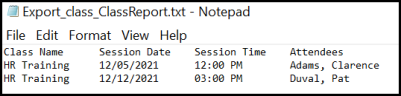
The text file includes the class name, session dates, session times, and list of attendees.